Radio Button in VF Page
<apex:selectRadio> command usage in salesforce
Code:
VF Page:
<apex:selectRadio
value="{!gChoice}">
<apex:selectOption itemLabel="
Choice1" itemValue="Choice1" />
<apex:selectOption
itemLabel="Choice2" itemValue=" Choice2"/>
</apex:selectRadio>
Controller:
public String gChoice { get; set; }
public Order orderTest{Get;set;}
orderTest.Group_Type__c=
gChoice ;
Result:
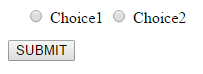
There is an Attribute called
"layout" in <apex:selectRadio> button which would allow
you radio buttons vertically.
Code:
<apex:selectRadio
value="{! gChoice }" layout="pageDirection">
<apex:selectOption itemLabel=" Choice1"
itemValue="Choice1" />
<apex:selectOption itemLabel="Choice2" itemValue="
Choice2"/>
</apex:selectRadio>
Result:
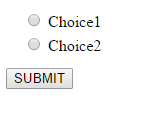
Layout attribute possible values "pageDirection", "lineDirection".
If not specified, this value
defaults to "lineDirection".
If you want to embed space between radio button and text do include the below code in the style.
input[type=radio] {
margin-left: 41px;
margin-right: 7px;
}
P.S: Comment Below for any Clarification or help!!
Happy working!! :) :)

Comments
Post a Comment